Unified Platform, Multiple Locations
Scale your salon business across multiple locations without the complexity. NXCut's multi-branch management system allows you to operate multiple salons under one unified platform while maintaining location-specific access control, reporting, and client management.
Powered by Supabase's authentication system, each staff member is assigned to specific locations, ensuring secure, role-based access. Clients can easily select their preferred branch on your website, and you get complete visibility across all locations from a single dashboard.
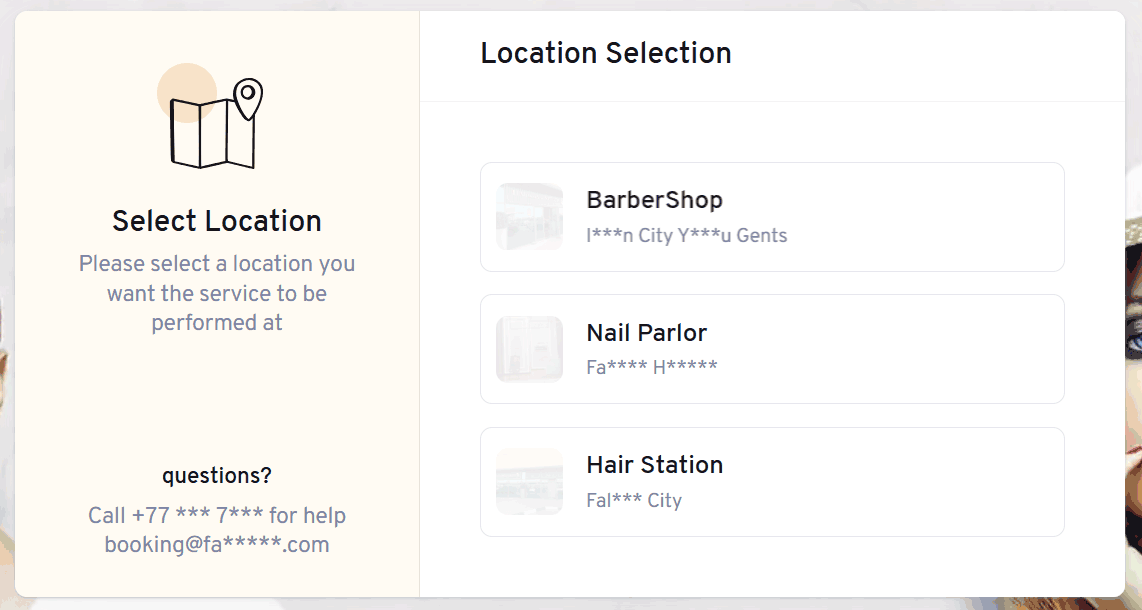
Location Selection Interface
Staff members see only the locations they're authorized to access when logging into the POS system.
How Multi-Branch Works
Supabase Authentication Per Location
Each staff member is assigned to specific salon locations via Supabase email authentication. When they log in to the POS, they only see and access the branches they're authorized for.
- •Role-based access control per location
- •Secure email/password authentication
- •Multi-location access for managers
- •Automatic location switching
Client Branch Selection
Your custom website displays all your salon locations. Clients can select their preferred branch, view location-specific availability, and book appointments at the most convenient location.
- •Interactive location map
- •Branch-specific service menus
- •Real-time availability per location
- •Location-based staff selection
Centralized Reporting
View consolidated reports across all locations or drill down into individual branch performance. Track revenue, appointments, and staff metrics at both macro and micro levels.
- •Cross-location revenue comparison
- •Per-branch analytics dashboard
- •Staff performance across locations
- •Inventory tracking per branch
Flexible Location Management
Easily add new locations, transfer staff between branches, and manage location-specific settings without disrupting operations at other branches.
- •Unlimited locations support
- •Independent operating hours per branch
- •Location-specific pricing rules
- •Branch-level discount controls
Staff Login Flow
Here's how staff members access the POS system when your business operates multiple locations:
Email Authentication
Staff member enters their email and password. Supabase verifies their credentials and retrieves their assigned location permissions.
Location Selection
If assigned to multiple locations, the staff member sees a location selector (as shown above). They choose which branch they're working at today.
POS Access
The POS loads with data specific to the selected location: appointments, clients, inventory, and staff schedules for that branch only.
Role-Based Features
Managers can switch between locations during their session. Staff see only the features and data they're authorized to access at their assigned branch.
Benefits for Multi-Location Businesses
Operational Efficiency
- ✓Manage all locations from one unified platform
- ✓Reduce training time with consistent interfaces
- ✓Standardize processes across all branches
- ✓Streamline staff transfers between locations
Business Intelligence
- ✓Compare performance across all locations
- ✓Identify best practices from top-performing branches
- ✓Track inventory and supplies across locations
- ✓Consolidated financial reporting for tax purposes
Security & Control
- ✓Location-based access prevents data leaks
- ✓Audit trail for cross-location activities
- ✓Granular permission controls per branch
- ✓Separate data isolation via Supabase
Client Experience
- ✓Easy location selection on booking website
- ✓Consistent service quality across all branches
- ✓View history across all your locations
- ✓Loyalty programs that work everywhere
Ready to Scale Your Business?
Manage multiple salon locations with ease. Centralized control, location-specific access, unified reporting.